Tap into the HeyCounsel hivemind.
Connect HeyCounsel to Claude and get answers grounded in the real-world experiences of your vetted peers.
 Claude and get answers grounded in the real-world experiences of your vetted peers.
Give your AI access to 51,976 Slack messages from 529 fractional, solo, and boutique lawyers, spanning 347 practice areas, 67 jurisdictions, and 19 countries.
Grounded in how your peers practice
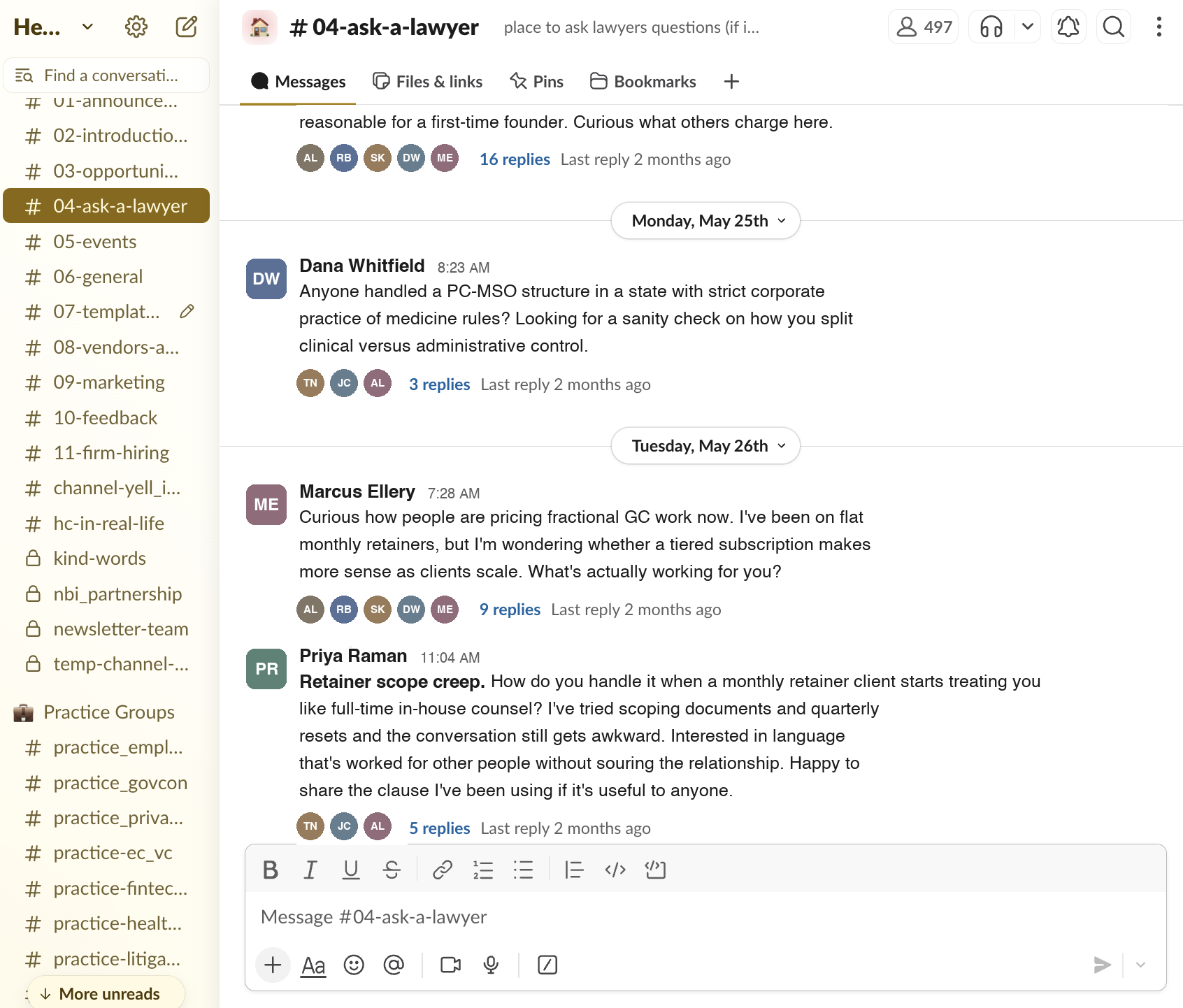
1.The community Slack
3 years and 51,976 messages of members working through problems together. In most Slacks that knowledge disappears into scroll history. Here Claude reads it back to you.
2.HeyCounsel Edu
Every recorded session in the library: outside experts and working practitioners who already solved the problem you’re hitting now.
3.Real firm statistics (from Pulse surveys)
Survey responses on how independent lawyers run their practices: rates, billing models, firm structure, and business development.
4.Real review data on tools (from Pulse surveys)
What solos and small firms run their practices on, across 20+ categories, rated by the members paying the bills.
5.Member-vetted templates
Members used and reviewed all 393 of them. Each one is tied to a member-contributor, so you can reach out directly with questions.
What members are saying.
“I was about to quote a potential client. Claude pulled the HeyCounsel data and told me I was on the low end for my hourly rate and should raise it. Absolutely loved it.”
 Lisa CapoteCapote Law Firm
“I was working through whether I needed an ERISA attorney on a deal and — without me asking — HeyCounsel MCP offered to source a fractional ERISA specialist from the HeyCounsel network and pull a shortlist. Incredible!”
 Austin YoungCurrent Counsel
“I’m planning my firm expansion using Claude and the HeyCounsel MCP is kicking butt. So far it’s helped me identify of-counsel candidates to recruit, plan comp models, and revise my subscription pricing.”
 Ryan JulianoDarwin Legal
“I’ve been experimenting with using the MCP as my practice coach. It told me some things I already knew I needed to do, and a few I noted for future exploration. It also gave me some frank advice!”
 Erik VelapoldiMosaic Legal Group
How members use it.
Real questions, from the day-to-day to the decisions that shape your practice.
“I’m quoting a SaaS company for ongoing commercial work. Am I priced right?”
Know what to charge before you send the quoteClaude checks your rate against what comparable members charge in your practice area, firm size, and jurisdiction, then tells you if you’re leaving money on the table.
“This deal has an ERISA component I don’t handle. Who in my network does?”
Fill the gap on a matter you can’t cover aloneA deal needs expertise outside your lane. Claude searches the member network and comes back with a shortlist, often before you think to ask.
“What are 3 business development ideas and 3 firm operations optimizations I could make based on community best practices?”
A practice coach that already knows your practiceClaude reads your profile, your Pulse answers, and what’s working for comparable members, then names specific moves you can make this quarter.
“What’s the best legal research AI tool for small firms and solos?”
Vet a tool before you buy itMembers rate the tools they pay for across 20+ categories, with pricing attached. Claude tells you what solos and small firms run, what they think of it, and what it costs them.
“What did I miss in Slack this week that’s relevant to my practice?”
A week of community discussion, in 30 seconds51,976 Slack messages is more than you can keep up with. Claude reads the parts relevant to your practice and tells you what’s worth a reply.
“Find me a contractor agreement template I can adapt for a design client.”
Never start a document from scratchMembers vetted all 393 templates. Claude finds the right starting point and adapts it to the matter in front of you.
“Who in the community does complementary work to mine that I could build a referral relationship with?”
Find the members worth trading referrals withClaude looks at what you do, then finds members whose practice sits next to yours without overlapping. Those are the people to trade referrals with.
“Scan recent open opportunities for ones I’m a real fit for, and help me draft a proposal.”
Bid only on work you’ll winClaude cross-references open opportunities against your profile, practice areas, and bar admissions, tells you which are worth your time, and drafts the proposal for the ones that are.
How it works.
- 01
Add the connector
In Claude, search for HeyCounsel in Anthropic’s connector directory, add it, and log in. Nothing to install and no keys to copy around.
- 02
Ask in plain English
No special syntax, no dashboards to learn. Ask the way you’d ask a colleague.
- 03
Claude pulls your HeyCounsel data
Community discussion, benchmark responses, the member directory, templates, and open opportunities, depending on what the question needs.
- 04
Get an answer grounded in real practices
Claude builds the answer from what independent lawyers in your position do, and shows you the responses it drew on.
- 05
Go deeper with the people behind it
Every answer traces back to real members. When you want to talk to one of them, you already know who to ask.
See the data before you apply.
We publish two of these reports for anyone to read. They preview what Claude sees once you’re a member.
Already a member?
Search for HeyCounsel in Claude’s connector directory, add it, and log in. Step-by-step instructions are in your settings if you want them.
Your data, on your terms.
- Read-only. Claude can look things up, but it can’t edit your profile, submit bids, or post on your behalf.
- You authorize the connection yourself, and you can disconnect it whenever you want.
- Claude sees only what you can already see in the app. Another member’s private data stays private.
- We don’t use your prompts or conversations to train models.
Full detail is in our Privacy Policy.
Frequently asked questions.
What is an MCP, exactly?
MCP stands for Model Context Protocol. It's an open standard that lets an AI assistant plug into tools and data from other services. Ours gives Claude an authorized way to look things up in your HeyCounsel account and across the community.
Who can use this?
Active HeyCounsel members. The MCP reads from your membership, so it needs an account to connect to. Apply for membership to get started.
How is this different from asking Claude directly?
Claude on its own works from public information and general training. It doesn't know what lawyers in your practice area charge, which tools they've tried and abandoned, or who in your network handles ERISA. The MCP hands it your community's own answers, discussions, and templates.
What can Claude access?
Your own profile and Pulse benchmark answers, the member directory, the community Slack archive, the legal template library, and open work opportunities. Nothing outside HeyCounsel, and nothing another member keeps private.
Can Claude change anything in my account?
No. This version is read-only. Claude can look things up, but it can't edit your profile, submit a bid, post in Slack, or act on your behalf. Write actions may come later, with confirmation steps.
Do you train on my prompts?
No. We don’t train anything on your conversations with Claude. You authorize the connection, and you can disconnect it whenever you want. Full detail sits in our Privacy Policy.
Does it work with ChatGPT or Perplexity?
Not yet. Claude works today, and ChatGPT and Perplexity are coming. MCP is an open standard, so adding an assistant won't change how you set things up.
Ready to tap into the community hivemind?
Join 529 fractional, solo, and boutique lawyers, then connect Claude to get more out of your membership.